- DATE:
- AUTHOR:
- Ezzan
WebApp Version 26.6 Changelog
This update includes new features, essential performance improvements, and usability enhancements, ensuring your daily operations run smoothly. We've also addressed several bug fixes to enhance stability and reliability. Thank you for your continued trust and feedback, which help us deliver the best possible service.
New Feature:
[Product - Variant Log] Variant Allocated Modified
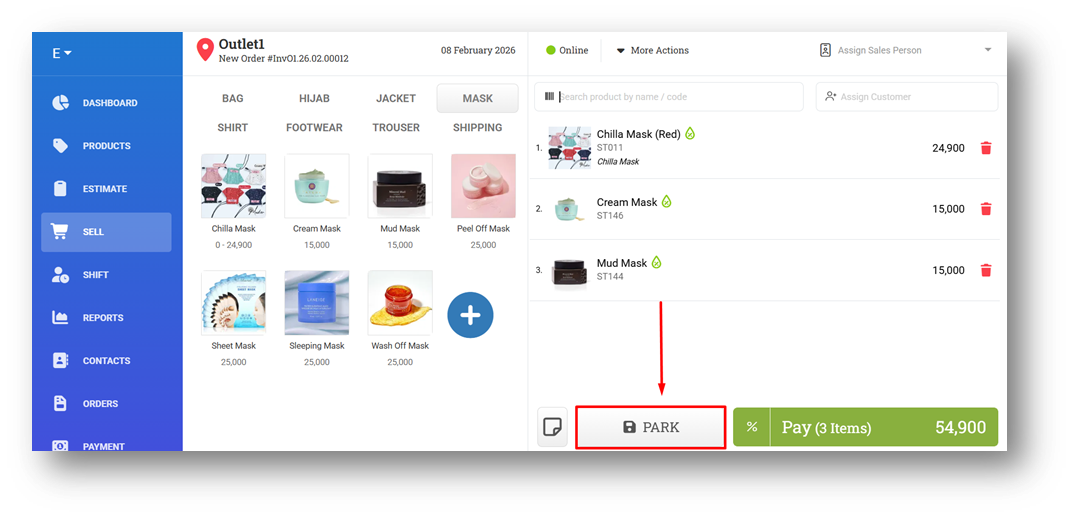
We’ve added a new inventory tracking enhancement, Allocated Modified History, to improve visibility into stock allocations. This feature covers three allocation scenarios: when Converting Estimate, when an Parking Orders, and when Creating Invoice with Fulfillment Later. In all of these cases, stock is allocated without reducing on-hand quantities, while available stock is reserved and marked as allocated. Previously, changes to allocated stock were not recorded in the modification history.
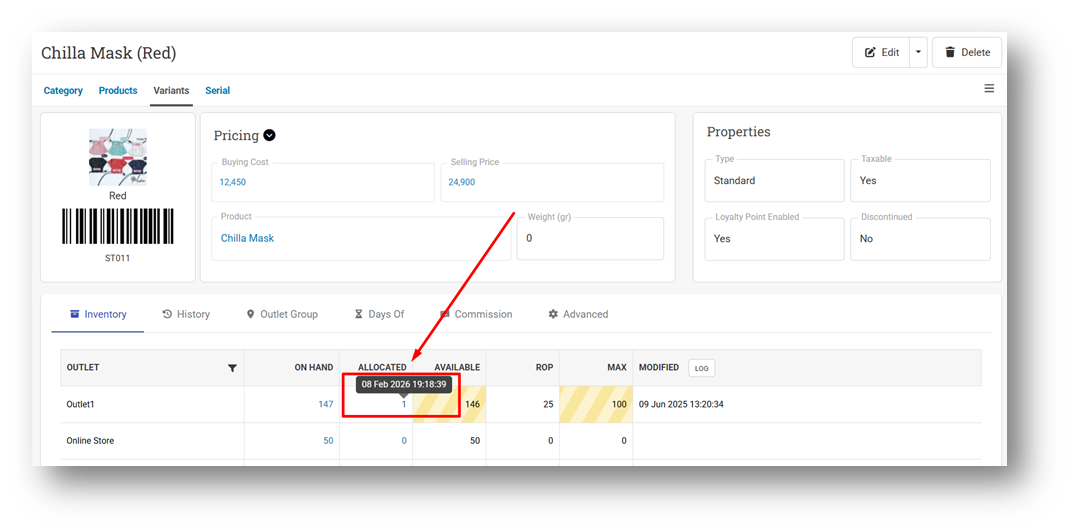
With this update, every allocation event is now recorded in the system. To keep the information simple and easy to read, only the latest allocation timestamp is shown (not the full allocation history). This information is available on the Variant Info page, displayed as a tooltip for Allocated stock per outlet, allowing users to quickly see when the last allocation occurred.
[Sell] Promotion Preview Before Payment
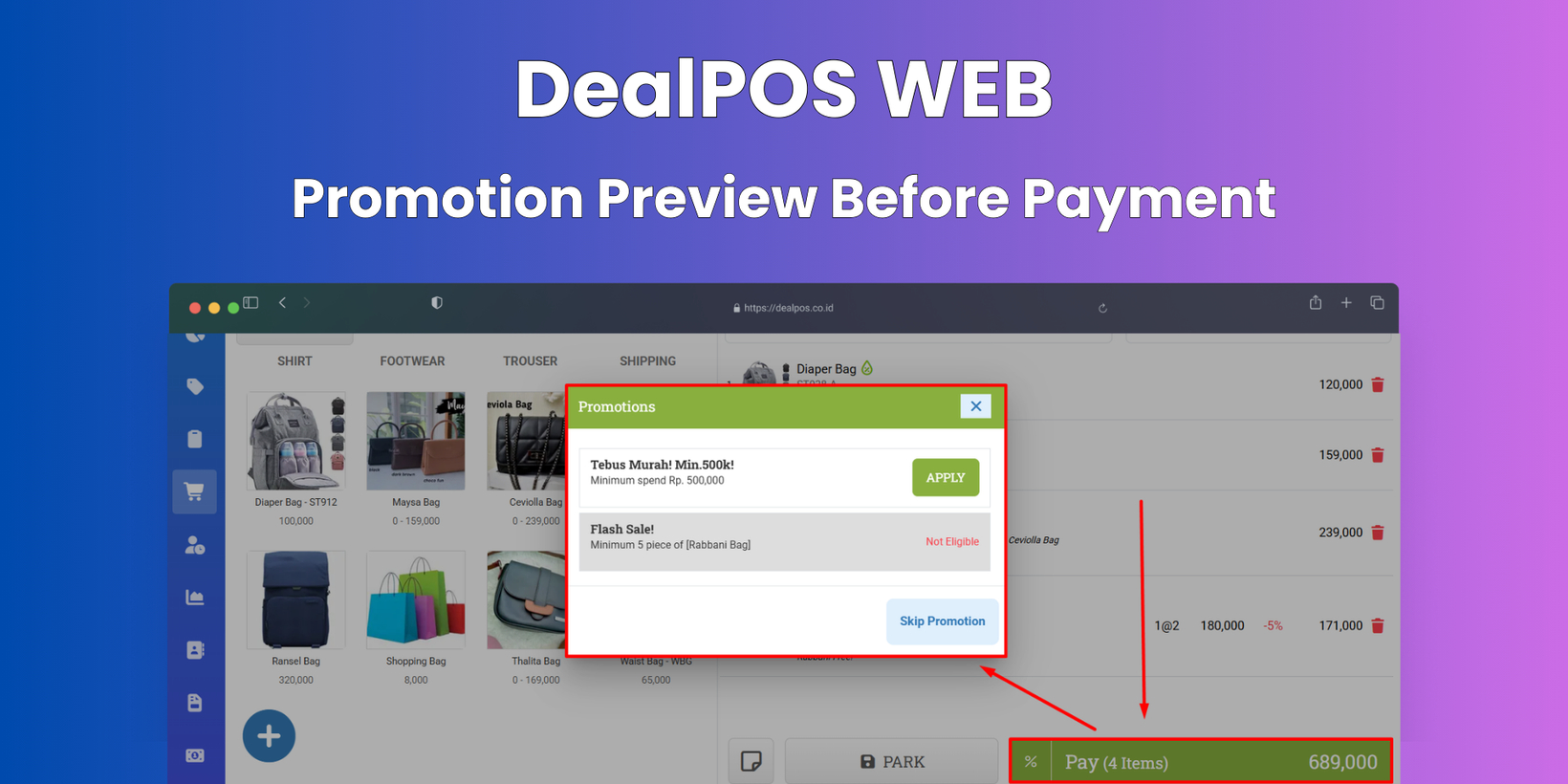
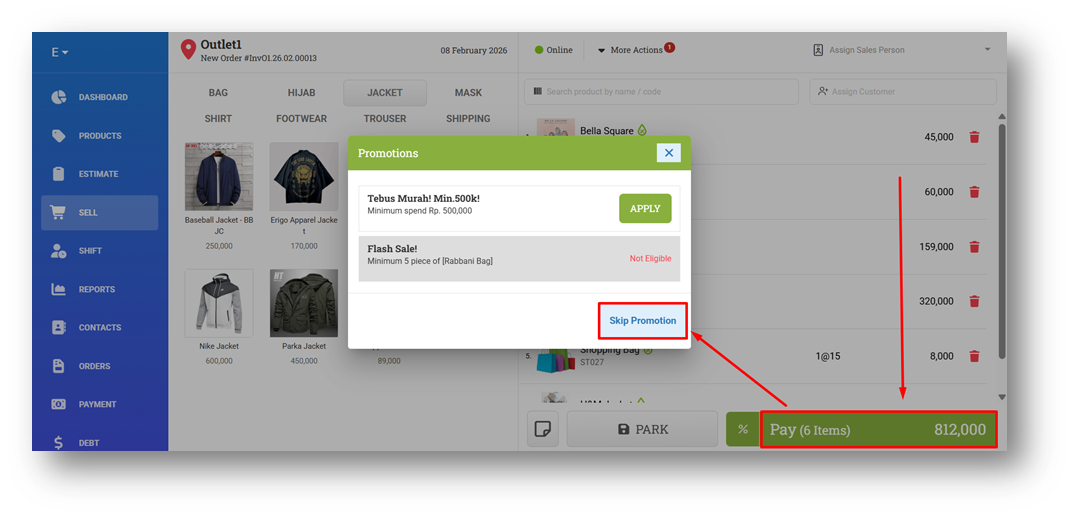
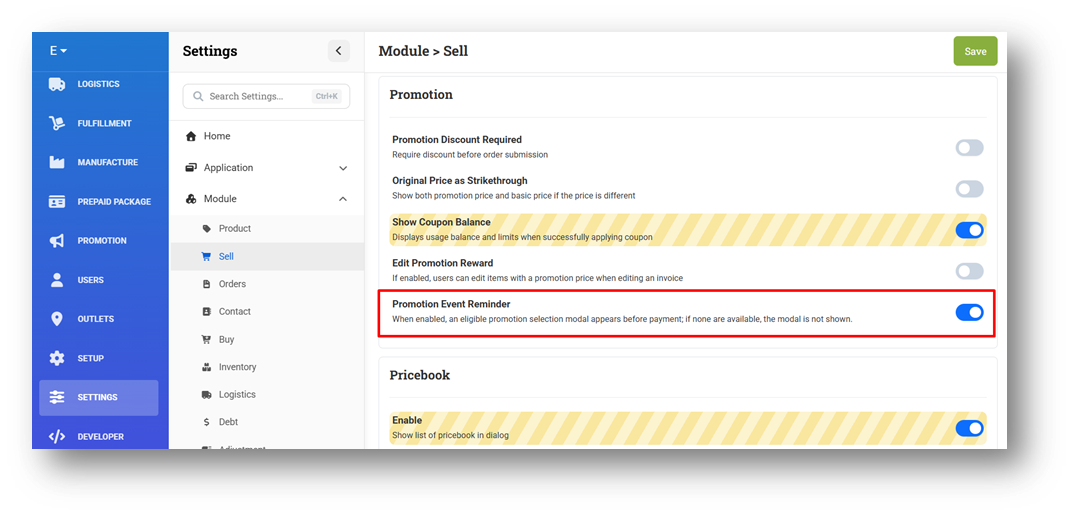
We’ve improved the checkout experience by introducing a new Promotion Preview modal during the Sell flow. When a sale has one or more eligible promotions, clicking Pay will now display a modal showing the available promotions. This allows cashiers to inform customers about applicable offers, thereby improving customer service.
Cashiers can choose to skip the promotion if they don’t want to apply it and continue directly to Payment. For flexibility, this feature can also be disabled from the Settings menu, allowing each store to decide whether the promotion preview should appear during checkout.
This feature was developed based on customer request #11196
[Developer] SendGrid Logs Page
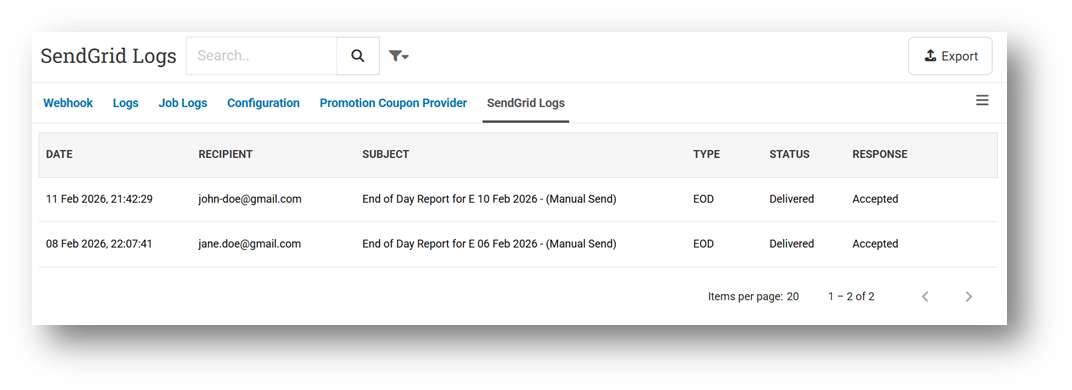
We’ve introduced a new SendGrid Logs page to help you track the delivery status of automated email reports sent through our SendGrid integration. This page displays the delivery information available from SendGrid; if certain details are not shown, it means SendGrid does not provide that data. You can review the Status column to confirm whether an email was successfully delivered (marked as Delivered / Success) or if there was an issue. Please note that in some cases, emails may be sent successfully but fail to arrive due to the recipient’s email provider settings. For further troubleshooting, you may check SendGrid’s Help Center or contact our support team; however, assistance is limited to the data provided by SendGrid. If delivery failures occur repeatedly, we recommend using an alternative recipient email address to improve reliability.
Minor Improvements:
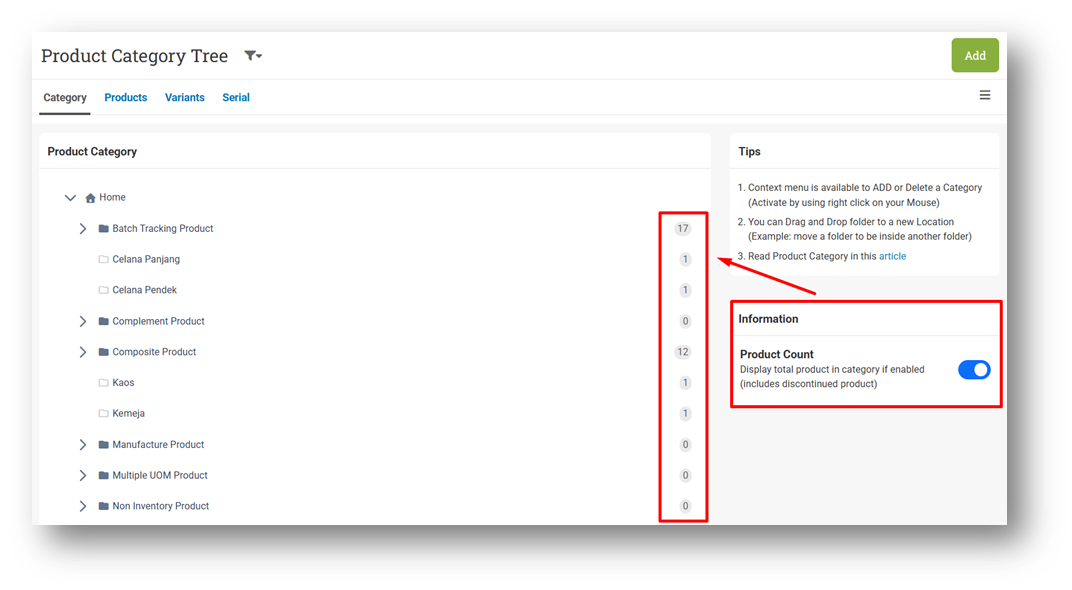
[Products - Category] Display Total Product in Category List
[Products]
Order Product Tags Based on CSV Import File
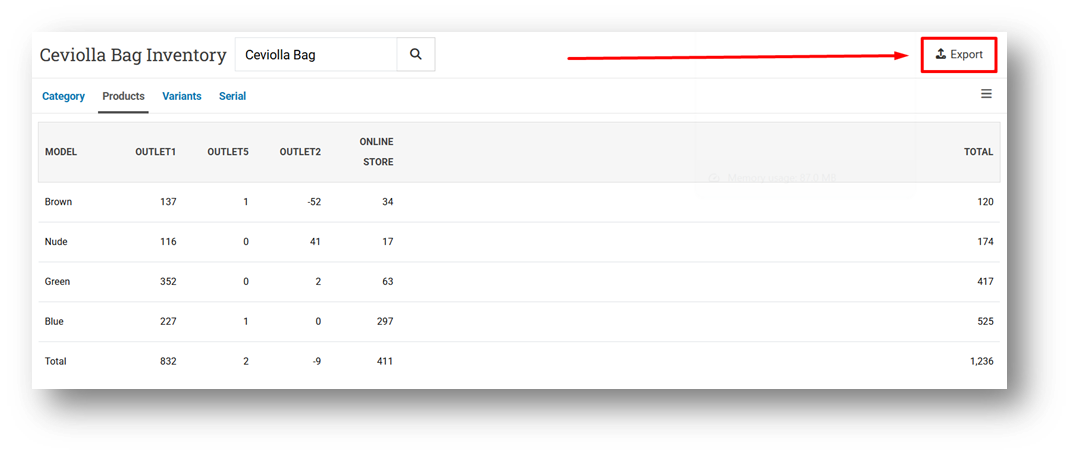
Provide Export Feature for Product Outlet Inventory Page
This feature was developed based on customer request #11265
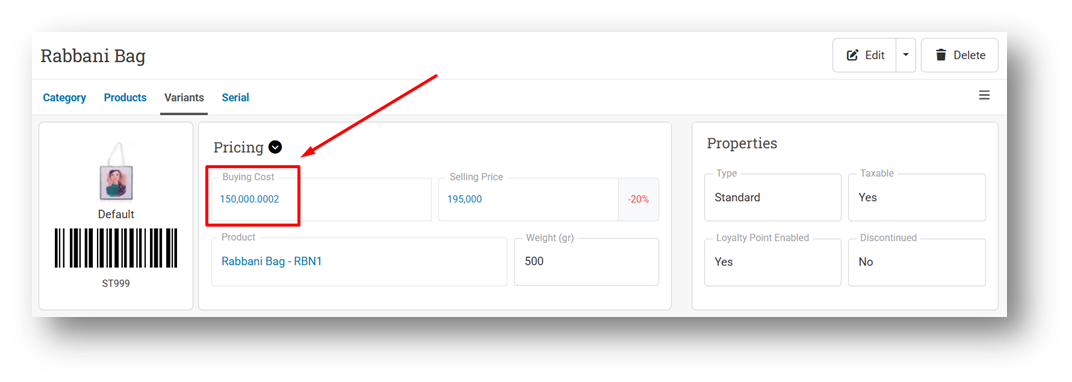
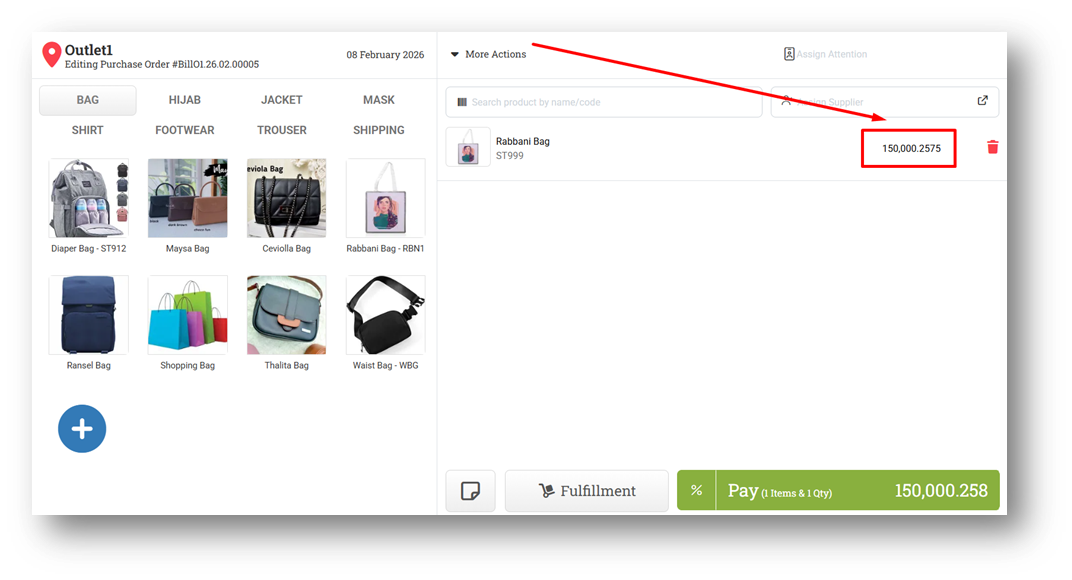
[Products - Variants] Remove Decimal Rounding for Item Cost in Variant Info
This feature was developed based on customer request #10871
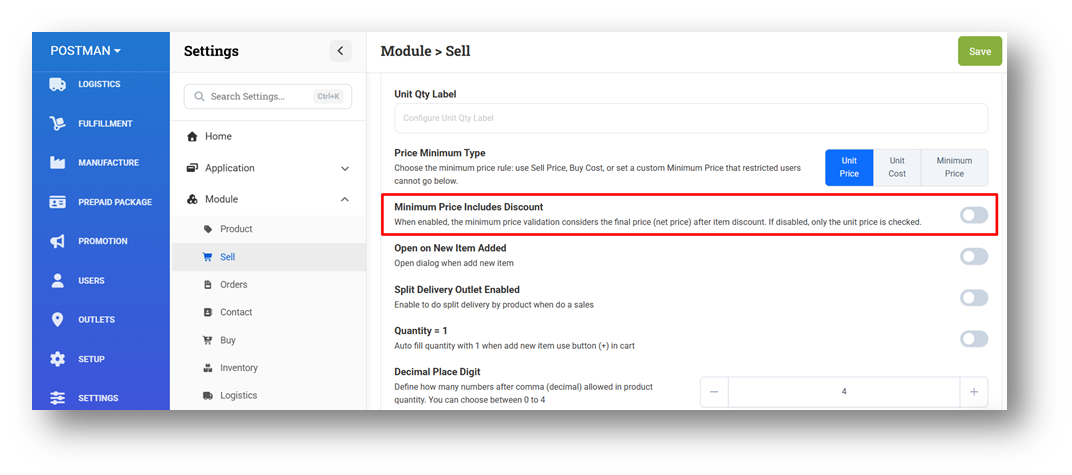
[Sell] Minimum Price Includes Discount
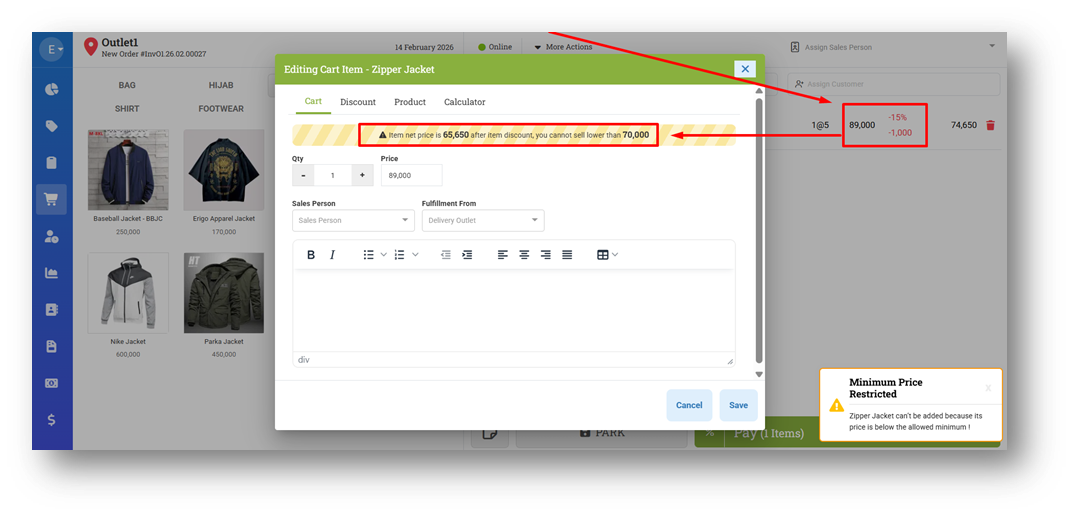
We’ve introduced a new setting, Minimum Price Includes Discount, to enhance the existing Minimum Price restriction feature. Previously, the system validated the minimum price against the item’s original price before any discount, so users could not set a selling price below the defined minimum, regardless of any discount applied afterward.
With this new setting enabled, the system will instead validate the final item price after discount against the defined Minimum Price. This ensures that the actual selling price received after discounts still complies with the minimum price policy. If the setting is disabled, the validation will continue to follow the previous logic (before-discount comparison), giving businesses flexibility in how they enforce pricing rules.
This feature was developed based on customer request #11393
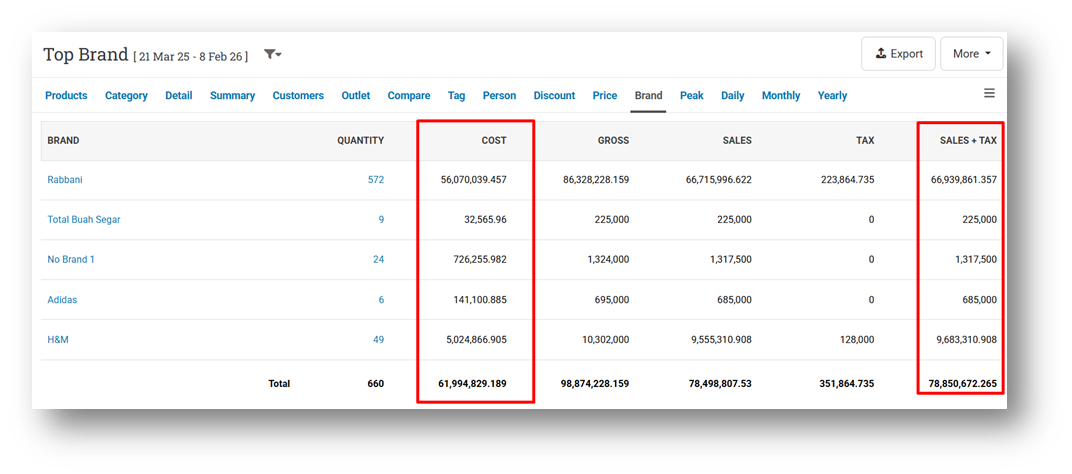
[Reports - Brand]
[Reports - Sales Return] Provide Net Sales Property
[Orders - Supplier Bill]
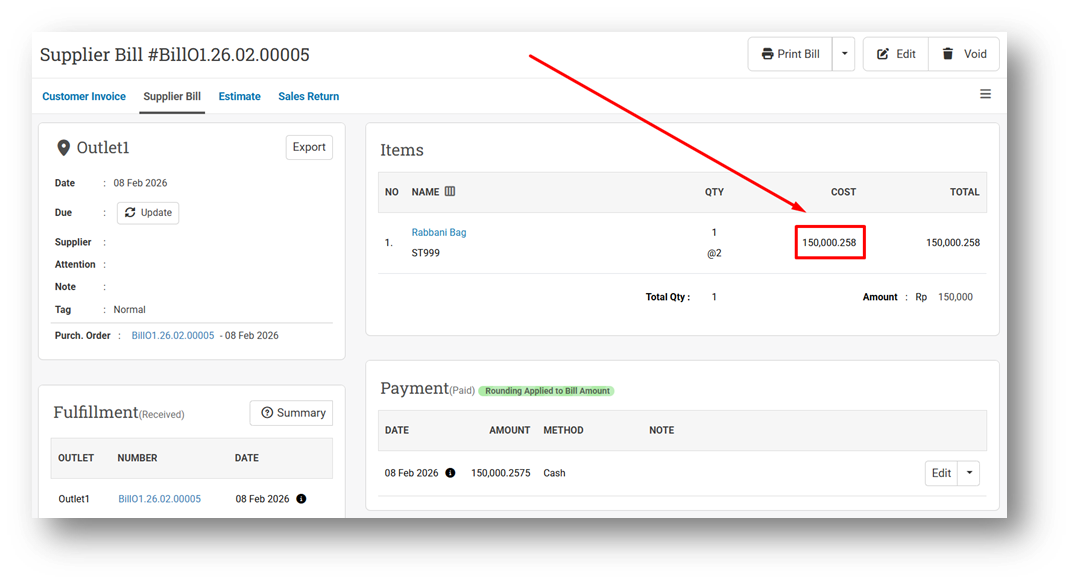
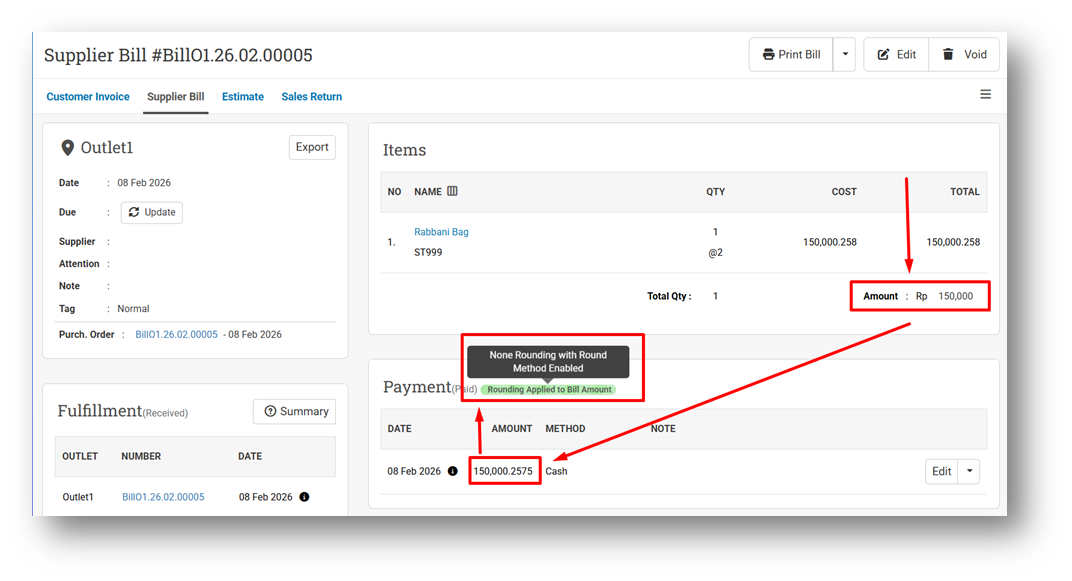
Remove Decimal Auto-Rounding for Item Unit Cost in Bill Info
Provide Total Payment Indicator for Rounding Differences
[Buy] Remove Decimal Rounding for Item Unit Cost
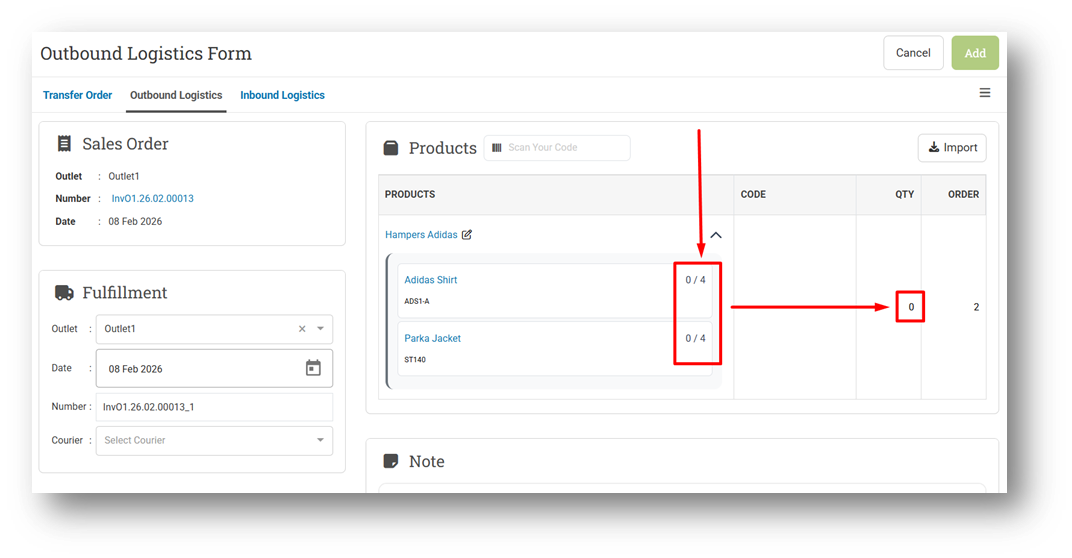
[Logistics] Improve Composite Scanning UX for Outbound & Inbound Form
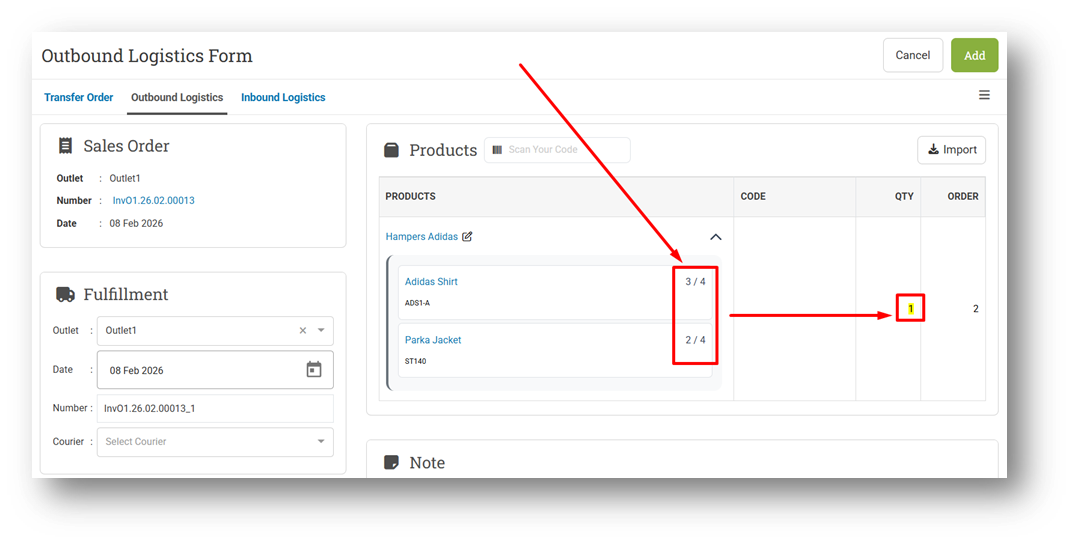
We’ve improved the scanning experience for composite products to make the process clearer and more efficient for warehouse teams. Previously, when scanning a composite product such as “Hampers Adidas” (consisting of 2 Adidas Shirts and 2 Parka Jackets), each component displayed a per-package indicator (for example, 0/2 for Adidas Shirts and 0/2 for Parka Jackets). When multiple bundles were sold, these indicators would reset after each set was completed, which could be confusing during bulk scanning.
With the new behavior, the indicator now shows the total quantity that needs to be scanned across all bundles (for example, 0/4 Adidas Shirts and 0/4 Parka Jackets when selling two Hampers Adidas). As components are scanned, the progress increases cumulatively. Each time the required quantity for a full bundle is reached (for example, reaching 2/4 for both components), the parent product quantity automatically increments by one. This allows users to scan all Adidas Shirts first and then continue with Parka Jackets, making the workflow more flexible and warehouse-friendly.
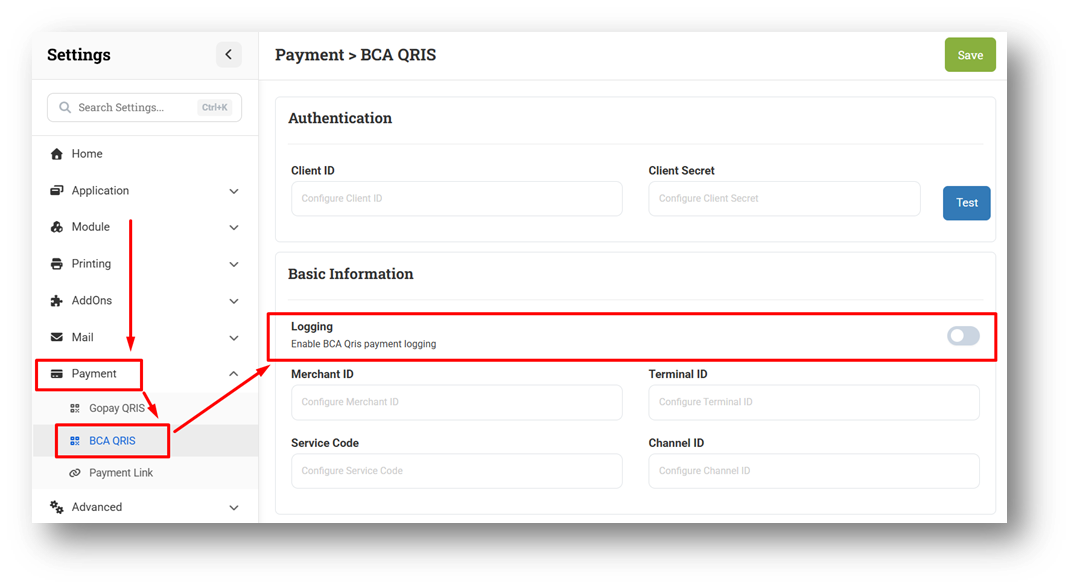
[Settings - Payment] Provide Default Value for Logging Settings on BCA QRIS Settings
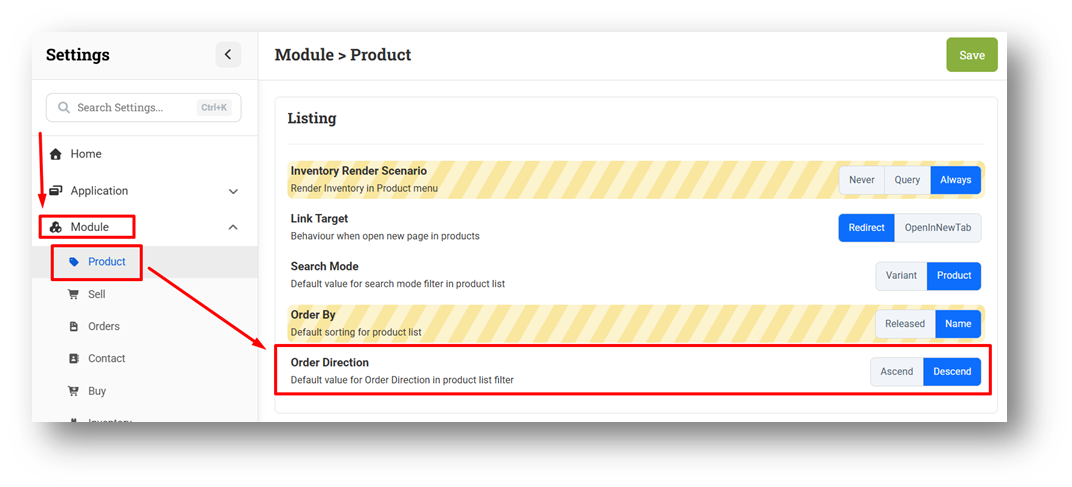
[Settings] Default Value Settings for Product List Order Direction
[Outlets] Optimize Create Outlet Query
[Developer Configuration] Provide Default Command Timeout Configuration for Heavy Query



Bug Fixes:
[Products] Restrict Max Order Price / Max Buying Cost Field in Info Page & Form with Product Cost Role
[Shift - My Shift] Display Unable to Close Shift Info When Exceeding Max Closure
[Shift - Active Shift] Fix Active Shift Details Not Displayed When Shift Exceeds Maximum Day Range
[Buy]
Fix COGS Update History Order Inconsistency
Fix Buy Shipping Restriction Role Does Not Work on Buy Form
[Settings - Mail] Fix Default Value Not Triggered Settings Color Logic
[Webhook - Buy] Fix Journal Created as Accounts Payable for Cash Purchase Due to Payment Created Date Mismatch
[Sharing Component] Fix Autofocus on Outlet Modal Moves to Product Search After Page Refresh
Patch 26.6.1 [11 Feb]:
[Products - Category] Fix Display for Settings Option
[Sell] Fix Promotion Modal Reappears When Editing Transaction with Existing Promotion
[Reports - Brand] Fix Sort Columns Feature Does Not Work Properly
[Developer - SendGrid Logs] Fix SendGrid Logs Page Display No Data
Patch 26.6.2 [14 Feb]:
[Promotion - Coupon] Fix Duplicate Warning When Possible Combinations Should Be Greater Than Requested
[Shift - My Shift] Hide Close Register Button When Shift Feature is Disabled
[Orders - Customer Invoice] Improve Invoice Print Layout for Long Recipient Address
[Orders - Supplier Bill] Fix Write Off Modal Not Appear
[Logistics - Transfer Order] Fix Peek Outlet Appears as Transfer Destination Outside Allowed Conditions
[Users - Groups] Prevent Sell Bundling Price and Sell Restriction Price Minimum from Being Enabled Together
[Settings - Module (Sell)] Fix Missing Decimal Digit & Calculator Configuration
[Settings - Advanced] Fix Users Cannot Submit WhatsApp Configuration
Patch 26.6.3 [18 Feb]:
[Sell]
Fix Autofocus Targets Search Product Instead of Opening Cash When Shift Is Active
Fix Min Price Include Discount Does Not Affect Item with More Than 1 Quantity
Fix Promo Available Reminder Appears When Editing Invoice with Applied Promotion
[Inventory - As Column] Improve Table Header Alignment
[Manufacture] Remove HTML Tag from A4 Manufacture Printing
[Settings] Fix Missing Close Side Menu Button in Mobile View
Patch 26.6.4 [19 Feb]:
[Sell]
Fix Minimum Price Validation Incorrectly Calculates Percentage Discount for Multiple Quantities
Provide Price Minimum Indicator in Discount & Calculator Tab
Remove Price Minimum Restriction Toaster
[Shift - Previous Shift]
Fix Payment Column: Display Payment Code Instead of Status in CSV Export Details
Order Invoice List by Created Date in CSV Export Details
Order Payment List by Invoice Number in CSV Export Details
[Adjustment] Fix Count Type Adjustment Display Zero Cost in Adjustment List
[Logistics - Transfer Order] Display Peek Access Outlet on Destination Outlet Option
[Settings - Module (Logistics)] Update Allow Peek Outlet Settings Name & Description
Patch 26.6.5 [20 Feb]:
[Logistics - Outbound] Fix Race Condition for Outbound Creation to Prevent Duplicate Outbound Record
[Settings] Fix Blank White Space in Settings Header After Navigating from Buy Menu
Stay tuned for more updates, and don't hesitate to reach out if you have any questions or need support