- DATE:
- AUTHOR:
- Ezzan
WebApp Version 26.15 Changelog
This update includes new features, essential performance improvements, and usability enhancements, ensuring your daily operations run smoothly. We've also addressed several bug fixes to enhance stability and reliability. DealPOS continues to evolve as a reliable POS Software designed to support retail business operations with better performance and usability.
Thank you for your continued trust and feedback, which help us deliver the best possible service.
New Feature:
[Orders - Packing Slip] QR Code for Packing Slip Printing
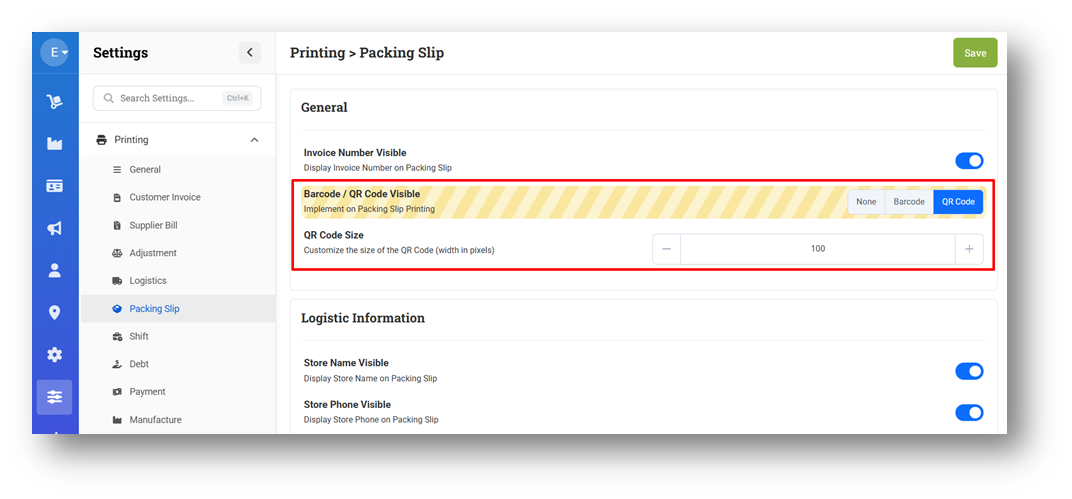
We’ve introduced new settings in Packing Slip printing that allow users to select between Barcode or QR Code and customize the size of the selected code. This gives users more control over how scan elements appear, ensuring they fit different operational and printing needs.
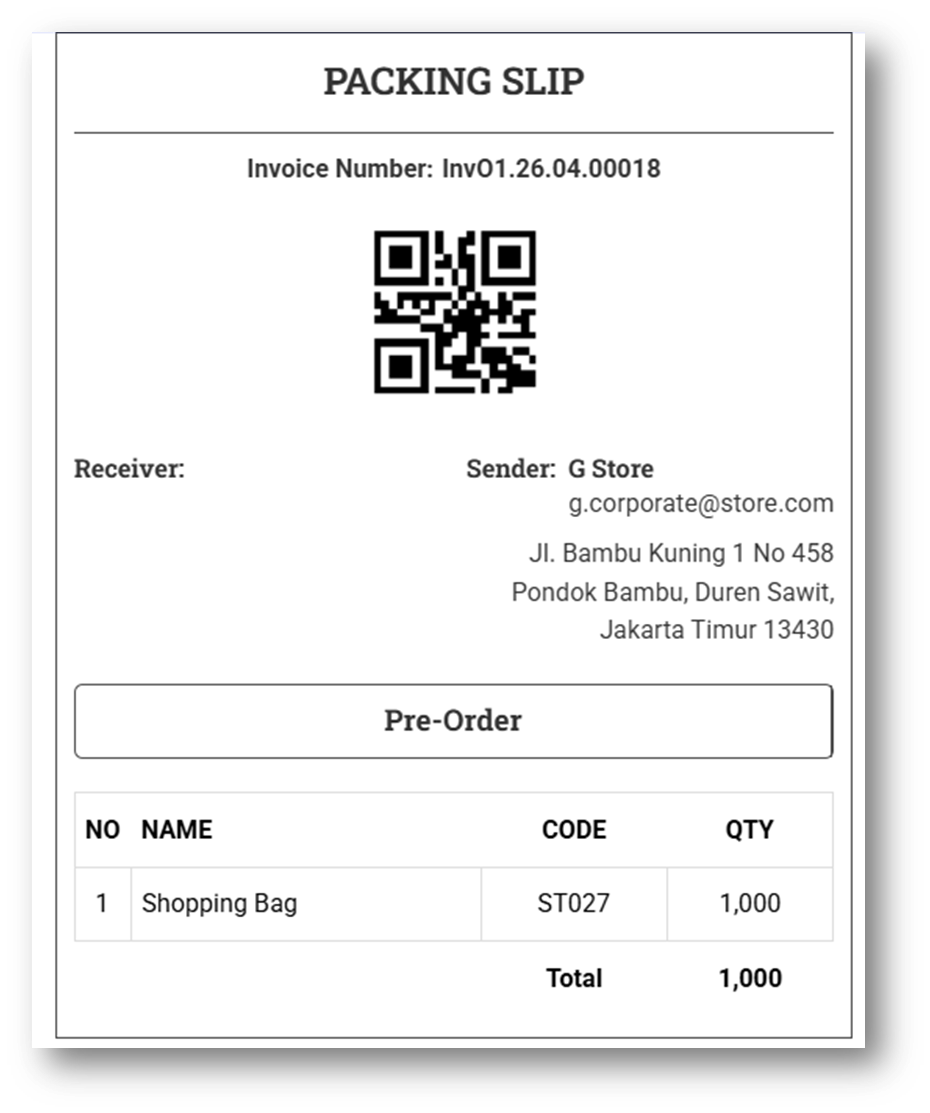
Users can then see the applied configuration directly in the print output, where the QR Code (or Barcode) is displayed based on the selected option and size, making it easier to scan during packing and fulfillment processes.
This feature was developed based on customer request #13557
[Orders - Printing] Product Sub UOM Visibility in Sell & Buy Modules
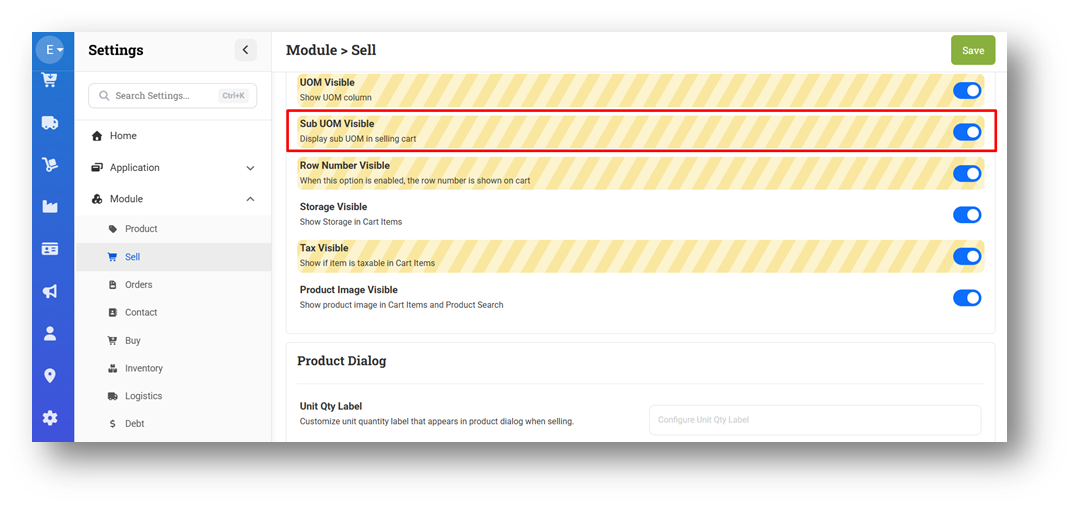
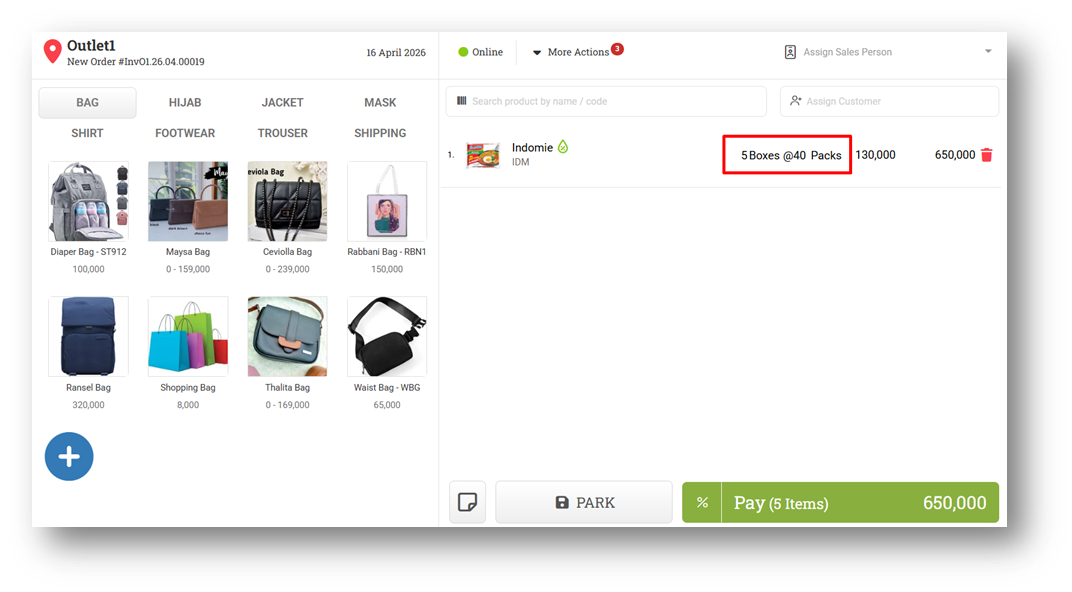
We’ve introduced a new setting called “Sub UOM Visible” in both the Sell and Buy modules, applicable in the Cart and Printing sections. This allows users to display Sub UOM (secondary unit) alongside the main UOM for better quantity clarity. For optimal usage, this setting should be enabled together with “Unit Quantity” (Variant Content).
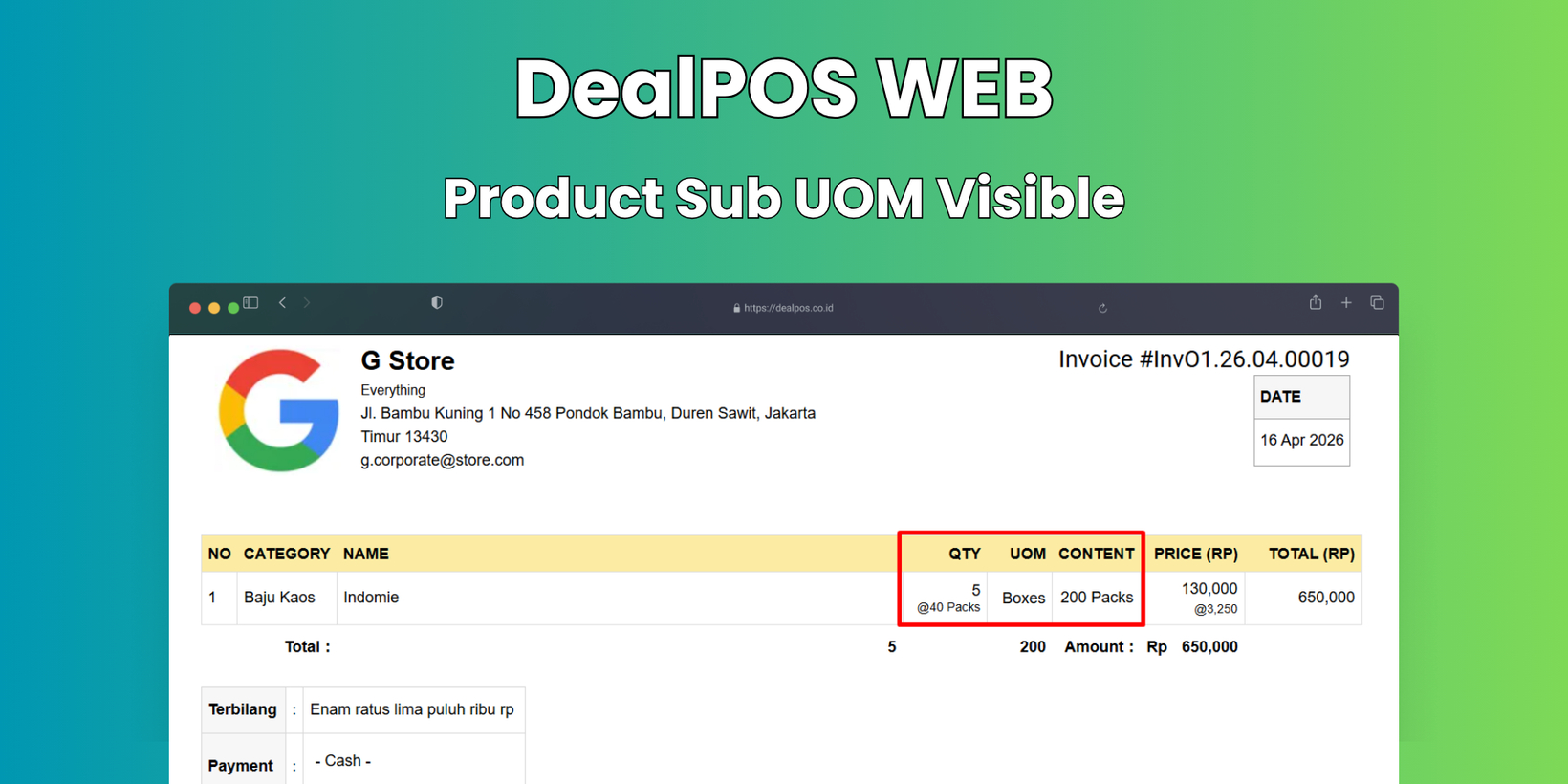
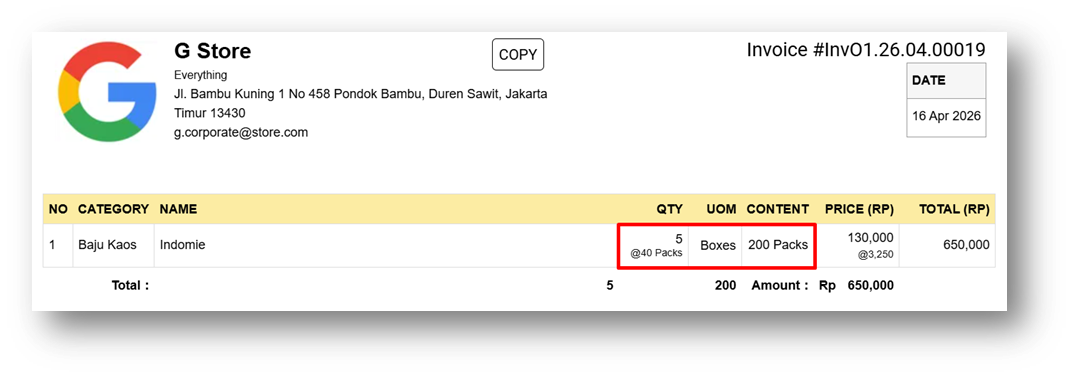
When combined, the system will display quantities in a more descriptive format. For example, if a product like Indomie is sold in Boxes (1 Boxes = 40 Packs), purchasing 3 Boxes will be shown as “3 Boxes @ 40 Packs”, making it easier to understand the actual item breakdown.
This format is also reflected in the printing output, ensuring consistency between what users see in the cart and what appears on printed documents, improving clarity for both internal operations and customers.
This feature was developed based on customer request #11297
Minor Improvements:
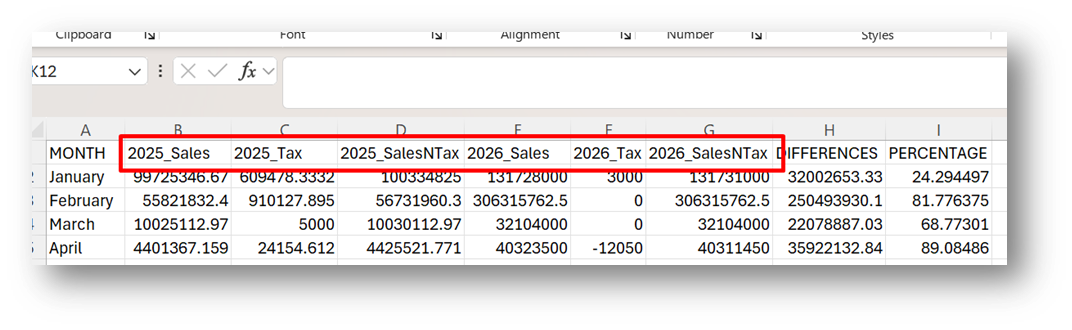
[Reports - Yearly] Provide Sales & Tax Column in CSV Exports
This feature was developed based on customer request #13649
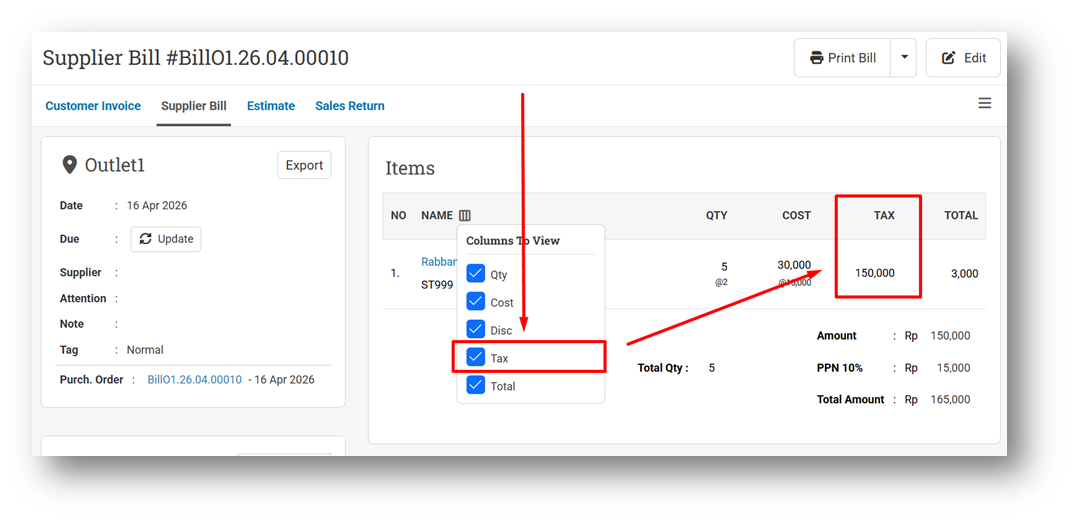
[Orders - Supplier Bill] Provide Item Tax Column in Bill Info
Bug Fixes:
[Orders - Invoice] Fix Incorrect Item Tax Amount for Negative Quantity Item
[Orders - Bill] Fix Incorrect Net Purchase on Bill Info for Negative Item Quantity
Patch 26.15.1 [21 Apr]:
[Products - Inventory Log]
Provide Export Format & Pagination
[Orders - Invoice] Fix Invoice Info Column Toggle Cannot Be Closed in Mobile View
[Debt - Join Invoice] Set Default Join Invoice Printing to New Format
[Fulfillment - Product To Receive]
Provide Row Count & Pagination
[Settings - Module (Orders)] Fix Orders Settings Display Blank Page
Patch 26.15.2 [22 Apr]:
[Products - Inventory Log] Provide Export with Order Number Option
[Orders - Customer Invoice] Improve Total Amount Position in Invoice Info
[Payment - Received by User] Exclude Voided Invoice from List
[Settings] Fix Incorrect Settings Default Caused App Error
Patch 26.15.3 [23 Apr]:
[Sell] Fix Missing Saved Fulfillment Date in Edit Form
[Reports - Outlet] Fix Sales in CSV Export Incorrectly Calculates Negative Amounts
[Adjustment] Fix Mismatch Cost Between List & Info Page
Patch 26.15.4 [25 Apr]:
[Adjustment] Fix List Error Caused by Count Adjustment with Duplicate Variants in Different Rows
[Adjustment - Web Spreadsheet] Fix Counted Quantity Data Loss During Repeated Searches
[Promotion - Event] Fix: Duplicate Reward Item Rows After Search and Edit
Patch 26.15.5 [27 Apr]:
[My Subscription] Fix Update Suspension Account Not Working
[Orders - Bill] Fix UOM Visible Settings Logic on A4 Bill Printing
[Settings - Module (Product)] Fix Product and Variant Name Combination Preview Not Rendering
[Settings - Printing (Packing Slip)] Update Default Barcode Width Settings
Overall, this update further establishes the platform as a reliable Inventory Application for your retail businesses. Stay tuned for more updates, and don't hesitate to reach out if you have any questions or need support!